
What is an audit plan?
The audit plan function is located in the Audit Management section. Here you can generate recurring audits and only have to define the audit, the auditor and the interval once. Afterwards, the audit will be automatically resubmitted in "Upcoming audits" at the intervals you have defined. How do I create an audit plan?- Click on "Audit management". You are now directly in the tab "Audit plans".
- Click on "+".
- In step 1, select the audit template that you want to create as a recurring audit
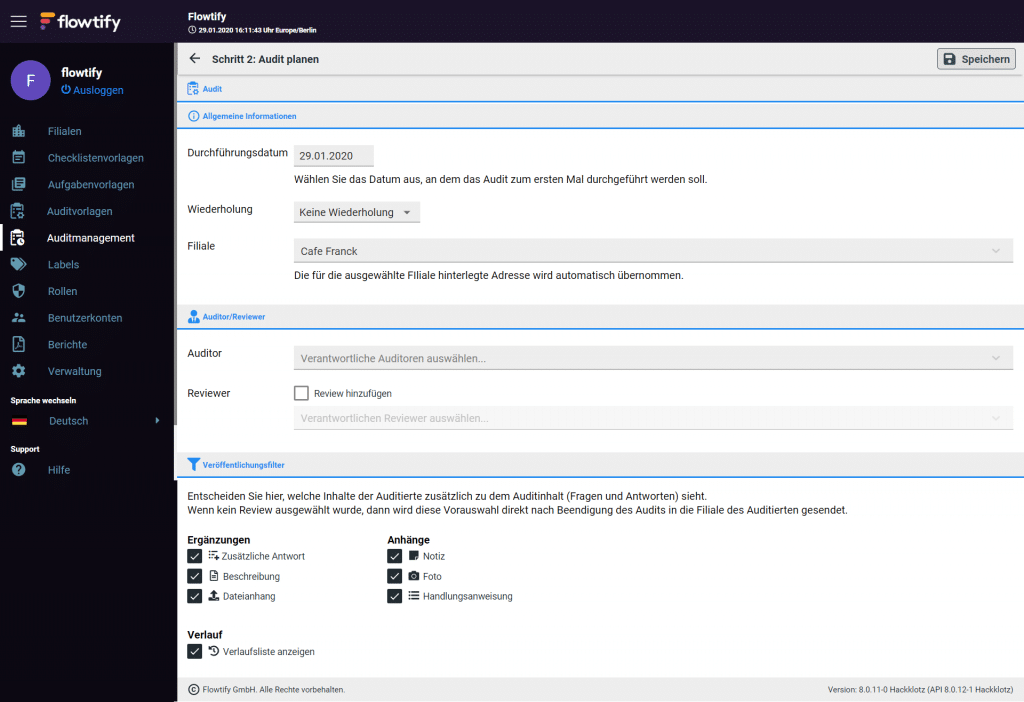
- In step 2, first select the execution date. This is the date you want the audit to occur for the first time.
- Select a recurrence for this audit. Here you define the interval. If the following audits cannot take place exactly on this date, the date can be changed later (see "Upcoming audits").
- Select the branch in which the audit is to be performed
- Optionally activate "Add review
- Select a reviewer.
- Select Supplements (have already been created in the audit template).
- Select attachments (documentation during the audit)
- Press "Save
- You can create multiple audit plans with different audit templates for one auditee.
- Click on "Audit management". You are now directly in the tab "Audit plans".
- Select the audit plan you want to change Make the desired changes
- Click "Save
- Click on "Audit management". You are now directly in the "Audit plans" tab
- Select the audit plan you want to delete
- Click on "Delete audit plan" in the bottom left corner
- Click "Yes" in the subsequent dialog to confirm the deletion