
What is a review?
A review is an optional possibility to conduct the follow-up of an audit in a four-eyes-principle. Within a dialog, auditor and reviewer can exchange information. Afterwards, only the auditor can make changes. Activate the review during audit planning even if you only want to correct possible typing errors. This is otherwise not possible.How is a review performed?
Once the audit has been sent for review by the auditor in the app, the review can begin. The review must be completed in order to generate deficiency lists and reports. If you, as a reviewer, have no comments, then you can click the "End Review" button directly in the top right corner. If not, then ...- Click on "Audit Management
- Select the "Audits performed" tab
- Open the desired audit
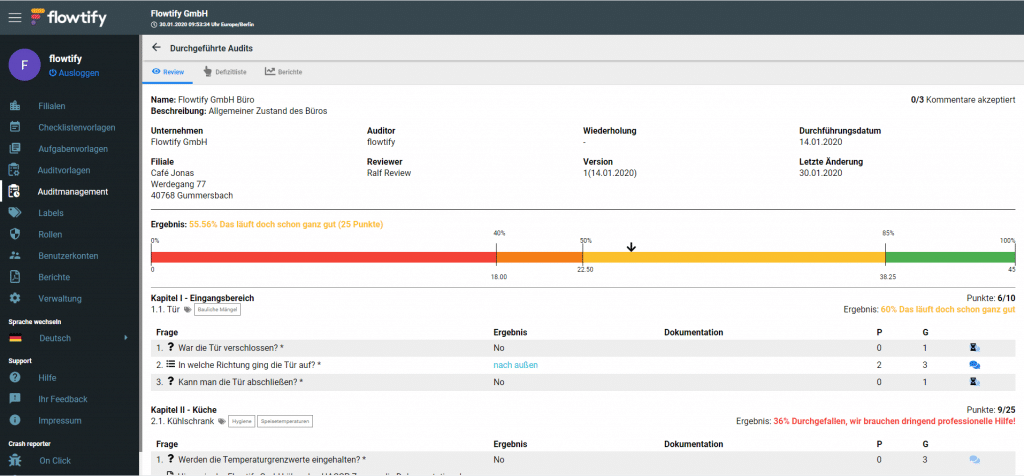
-
- In the Review tab, click on the speech bubble next to the question on the far right if there is something to complain about in a question/answer. Only by contacting the auditor in this way can changes be made to the audit.
- Enter a message for the auditor and click on "Send Comment".
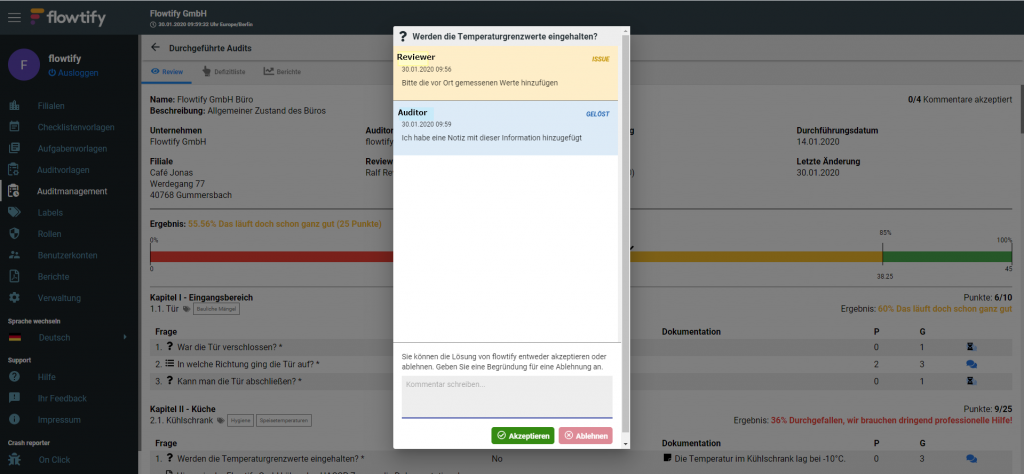
-
-
- Click "Accept" if the auditor's response resolved the original issue
- Click "Reject" and enter a comment if the problem needs further work
- When all the opened dialogs with the auditor have been accepted, you will see speech bubbles everywhere with a checkmark on them. Also, the counter at the top right of the screen will then become a button again.
- Click the "Exit Review" button in the upper right corner.
-